New One project, a website and an installable mobile app

Build a website or a mobile app with AI

To build a website or app with AI, describe your idea in plain English. Eqlo designs the pages, writes the copy, sets up the admin you will use every day and puts the project online, with nothing to install.

No coding requiredNothing to installNo card to startHosting and SEO included
eqlo studio, untitled project
A website for my hair salon in Austin, with services, prices and online booking.
On it. Building your site.
  • Page structure
  • Design and colors
  • Copy and services
  • Online booking
  • Ready for Google
5 free projectsStart from one sentenceSite admin includedTest QR valid for 24 h

Website or mobile app: where do you start?

Whenever you build a website or app with AI here, the path is the same: you describe it, Eqlo builds it, you publish it.

Website

Build a website with AI

A contractor's business site, a maker's online shop, a salon's booking calendar or a photographer's portfolio. Eqlo writes the pages, the copy and the forms, creates the admin you use to run the site, then publishes it on an eqlo.dev address or your own domain.

  • Business site
  • Online store
  • Booking
  • Landing page
  • Portfolio
Build a website or app with AI: the light, airy site of Marigold, an all-day brunch café in South Austin made with Eqlo, with its sunny table photo, the headline Brunch that stays unhurried, a Book a table button and its brunch plates (smoked salmon and avocado toast $15, buttermilk pancakes with maple syrup $13)
Mobile app

Build a mobile app with AI

An app that installs on iPhone and Android, with a bottom tab bar, member accounts and screens that stay readable offline. You try it on your phone with a QR code. Eqlo then prepares the App Store and Google Play listing, and on the Plus plan sends the signed build to both stores for testing.

  • iPhone
  • Android
  • Test QR
  • Store listing
  • Offline screens
Two screens from the East Austin Run Club app built with Eqlo: this week's runs (Tuesday Social 5K, Thursday Hill Repeats) and the October 2026 mileage leaderboard
Features

Build the project, then run it from the same place

Once the site is live, the work carries on: answering requests, tracking sales, adjusting pages. Eqlo keeps building and day-to-day management in one tool.

A website or an app from one sentence

The AI writes the pages, picks a style and lists what is left to set up, then the first version appears in the preview.

The Eqlo studio: the conversation on the left, the restaurant website built from one sentence on the right

An admin dashboard for every website

The admin opens at your site address followed by /admin, with visitors, requests and the most-read pages.

Admin overview of a plumber’s website: visitors, page views, requests and the latest requests

Edit by writing

One sentence changes a section, and the previous version stays one click away.

Mobile app

A QR code to try it on your phone, then test builds sent to the stores on the Plus plan.

Requests and quotes

Completed forms reach the admin inbox and your email at the same time.

Bookings

Online time slots, an optional deposit and a reminder before each appointment.

Commission-free shop

Customers pay by card, and every sale goes to your own Stripe account.

Cookie-free analytics

Visits and their sources are counted on the server, so there is no banner to show.

Hosting and domain

A free address to start, then your own domain name.

Connections

Slack, Notion, Google Sheets, Twilio, GitHub, HubSpot and Brevo, set up in a few settings.

How it works

Build a website or app with AI in four steps

If you can write a text message, you can use Eqlo. You explain what you want, watch the result appear, then ask for changes one at a time.

Step 01

Describe the project

One or two sentences are enough: what you do, and what visitors should be able to do. You can attach up to six files, such as a logo, photos or existing copy.

"A website for my hair salon in Austin, with services, prices and online booking."

Step 02

Watch it get built

Eqlo picks a style that suits your trade, writes the pages and adds free stock photos. A summary then shows what is done and what still needs setting up.

"Your site is ready: 4 pages, a booking form and a photo gallery."

Step 03

Change it in plain English

Point at a section in the preview and write what should change, the way you would tell a colleague. Every edit creates a version, and a single shortcut takes you back.

"Make the team photo bigger and switch the orange to navy."

Step 04

Publish and get found

One button puts the site live, with its security certificate and a sitemap for Google. Before publishing, Eqlo checks every page and suggests the fix if a rule is missed.

"Live on lumieresalon.com, ready to be found on Google."

No developer neededThe code stays out of sight until you ask to see it.
No designer neededStyles, fonts and colors come from 21 art directions.
No host to chooseHosting and the HTTPS certificate come with every plan.
No SEO agency neededTitles, descriptions and structured data are written with each page.

Edit, test, publish: three everyday moves

These three moments show the gap with a classic site builder, where every setting is done by dragging and clicking.

The team section of the Lumiere Salon site selected in the Eqlo preview, with the request "Make the team photo bigger and switch the orange to navy" ready to send

Edit without code

Select a block and type the change as a sentence. Eqlo updates that block and leaves the rest of the page alone.

Test QR code and link valid for 24 hours in Eqlo, next to the test build of the East Austin Run Club app

Test on your phone

Scan the QR code and the app opens on your phone, with no Apple or Google account. The link stays valid for 24 hours.

Eqlo Publish screen: Lumiere Salon live on lumieresalon.com as version 3, domain active and 18 of 18 checks passed, including "The sitemap lists the 5 indexable pages"

Publish and get found

The domain, the HTTPS certificate and the sitemap for Google are ready the moment you publish.

Search

An AI-built site that Google can read

Plenty of sites generated in minutes stay invisible, because their text only appears after scripts load. With Eqlo, every published page is a complete HTML document that Google and AI search engines can read on their first visit.

The title, the description and the structure are written along with the page. If something is missing, such as an image without a description or a second main heading, publishing stops and Eqlo suggests the fix.

  • A unique title and description of the right length on every page
  • Structured data that fits: local business on the home page, product and price on each product page
  • A sitemap, a robots.txt file and an llms.txt file for AI search engines
  • Photos converted to WebP at 200 KB or less, described by the AI in alt text
  • Templates tested to score 95 or more for SEO and accessibility on mobile
  • A Pages tab that shows whether each page can be indexed and how to fix an error

How Eqlo helps your site get found

The Pages tab of the Eqlo studio next to the Lumiere Salon preview: every check passes, and the home page shows its title and description as they appear in Google, their length (46/60 and 118/160) and Visible to search engines

Eqlo next to the other AI builders

Other AI builders shine at prototyping an application. Eqlo aims for a different result: a site that Google can read, run day to day from its own admin, with an installable mobile version.

How Eqlo compares with vibe coding platforms and classic website builders
CriterionEqloVibe coding platformsClassic builders
Pages Google can read from day oneYesOften notYes
Installable iOS and Android appYes, stores on PlusRarelyPaid add-on
Source code you can take awayYes, export and GitHubVariesNo
Admin to run the site every dayBuilt with the siteBuild it yourselfIncluded
Editing in plain languageYesYesVisual editor
Business details written for searchAutomaticManualPartial
Entry priceFree, then $19/moCredit metered$10 to $30/mo

Comparison compiled in September 2026 from publicly available plans. These platforms move fast. If you spot something out of date, tell us and we will correct it.

What keeps the project running, already included

A members area, payments, versions and analytics come with the project. That is what separates a working site from a mockup.

Members area

Visitors create an account and sign in with a code sent by email or with a password. Some pages can be reserved for members, or for Premium members only.

Payments into your Stripe account

Store sales, deposits, dues or monthly subscriptions go to your own Stripe account, which you can create from Eqlo. Eqlo takes no commission.

Full history

Every edit creates a dated version with its author. Compare two versions or restore an earlier one in a click.

Cookie-free analytics

Page views, traffic sources and requests over 30 days, with no cookie banner to show.

A shield drawn above orange columns, illustrating the security of sites published with Eqlo

Sites protected from the first publish

Only your site scripts and Stripe are allowed to run. Your Stripe, store and CRM keys are encrypted.

The tools you already use, linked to the project

Stripe, Google Calendar, Outlook, Notion, Slack, Google Sheets, Brevo, HubSpot, Twilio and GitHub. Each connection has a test button and keeps a log of what it sends.

Eqlo Connections screen: payments and calendar connected, messaging and spreadsheet ready to link
For developers

Readable code you can take over

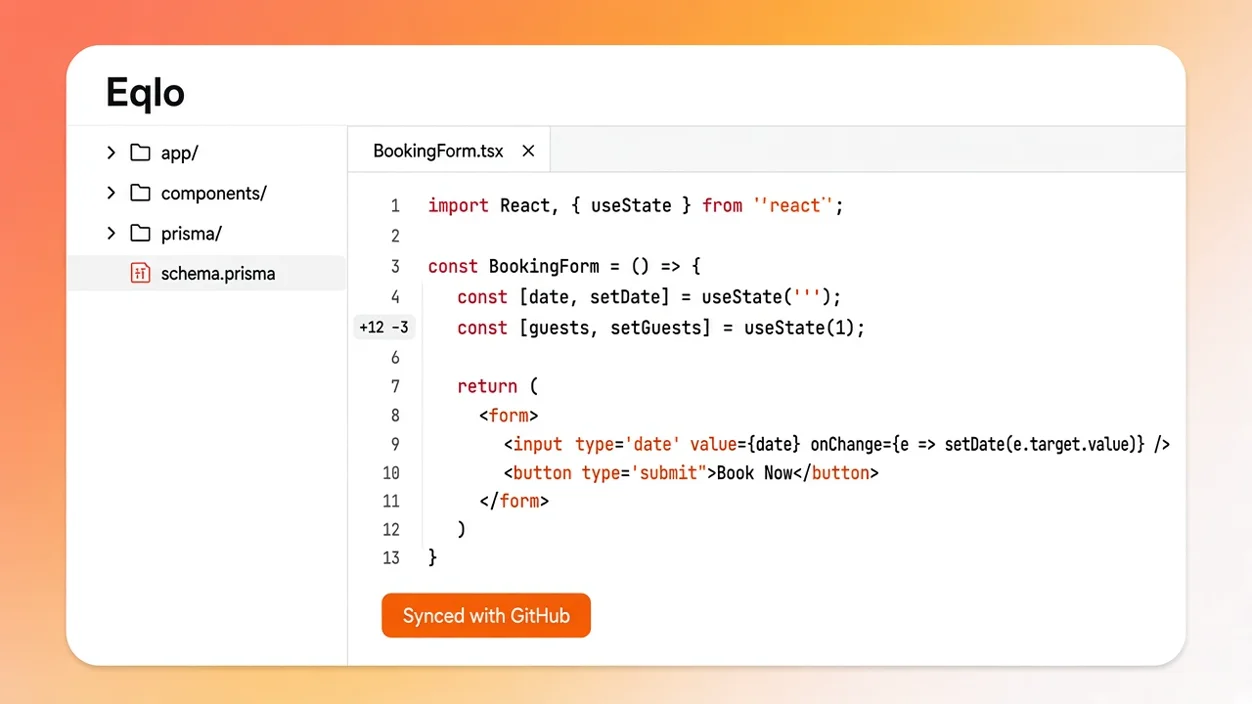
You describe the project in plain English, and Eqlo hands back a complete Next.js codebase to read, change or host elsewhere. Changes made in your repository come back into Eqlo as a new version.

  • Next.js, React and TypeScript for the site, Expo and React Native for the mobile app
  • Two-way GitHub sync, with a new version each time the repository sends changes back
  • Data tables you can export to CSV or SQL at any time
  • Signed webhooks to Make, Zapier, n8n or your own server

Eqlo for developersDocumentation

Code editor showing the BookingForm React component, with the app and components folders and a Synced with GitHub button

Frequently asked questions

How do I build a website with AI?

Write what your business does, the pages you want and what visitors should be able to do. If the request is very short, Eqlo asks up to three questions, then builds the site: the AI first drafts a detailed plan of the project, and a compiler turns that plan into fast pages that Google can read, checked before every launch. You refine it section by section by writing what should change. The first version shows in the preview as soon as it is ready.

Do I need to code to build a website or app with AI?

No. You write in plain English, and Eqlo takes care of the design, the code and the launch. You can also fix a piece of text directly in the preview with a click. If you code, you can push the project to your GitHub repository and work on it in your editor.

Can I build a mobile app without coding?

Yes. Eqlo produces an app that installs on iPhone and Android, which you can test right away with a QR code. On the Plus plan, the app is signed and sent for testing on TestFlight and Google Play. The developer accounts are yours to open: $99 a year for Apple, and a one-time $25 for Google.

Will a site built by AI actually rank on Google?

It starts on solid ground when its content can be read from the day it goes live. Every Eqlo page is published as complete HTML, with a title, a description, structured data and described images. Rankings then depend on your content and your reputation, and no tool can promise the top spot.

How much does it cost?

Starting is free: five projects, hosting and an eqlo.dev address, with no card required. For $19 a month, the Plus plan brings your own domain, unlimited projects and a signed app for the stores. For comparison, an agency-built business site usually costs between $3,000 and $12,000.

How long does it take?

Generating the first version is automatic. Then plan on one to two hours of back and forth for a business site ready to publish, and about half a day for a store with its catalog, shipping and checkout.

Do I own the code?

Yes. Code export is included on every plan, and the GitHub connection sends a complete Next.js project in React and TypeScript to your repository. You can clone it, change it and host it somewhere else whenever you want.

How is Eqlo different from Lovable, Bolt or Base44?

Those platforms are very good at prototyping a web application. Eqlo makes three different choices: every page is checked for Google before it goes live, each site comes with its own admin, and the same project gives you an installable mobile app. For a quick internal prototype, the others serve well.

What is vibe coding?

Vibe coding means describing the result you want in plain language instead of writing the code yourself. At Eqlo, the AI drafts the plan of the site and a compiler turns it into pages, which keeps sites fast and readable by Google.

Who receives the money from my sales?

You do. Store payments, deposits and membership dues go to your own Stripe account. Stripe charges its usual card fees, and Eqlo takes no commission on your sales.

Describe your project and watch it take shape

Five free projects, no card required. Describe your project, and the first version shows in the preview.